
1. Introduction
Welcome to the Innovs EAA Compliance plugin! This guide will walk you through every feature to help you leverage this powerful tool and ensure your website meets the requirements of the European Accessibility Act (EAA). The EAA is a landmark piece of legislation aimed at improving digital access for people with disabilities. With a compliance deadline of June 28, 2025, it is crucial for businesses serving EU customers to make their websites accessible.
This plugin is designed to be your first line of defense, helping you identify and fix common accessibility issues before you publish content. From a real-time content scanner to a dedicated dashboard widget and an accessibility statement generator, this tool provides a comprehensive solution to aid in your compliance journey.
This guide will cover installation, configuration, and the day-to-day use of all the plugin’s features.
2. Installation
Installing the EAA Compliance plugin is a straightforward process:
1.Navigate to your WordPress admin dashboard.
2.Go to Plugins > Add New.
3.Click the Upload Plugin button at the top of the page.
4.Click Choose File and select the InnovsEAACompliance.zip file you received.
5.Click Install Now.
6.Once the installation is complete, click Activate Plugin.
Upon activation, you will see a new top-level menu item in your admin sidebar called “EAA Compliance”, marked with a universal access icon.
3. Configuration: The Settings Page
The main settings page is the central hub for configuring the plugin. You can access it by navigating to EAA Compliance > Settings from your WordPress admin menu.
The page features a modern, two-column layout for easy navigation.
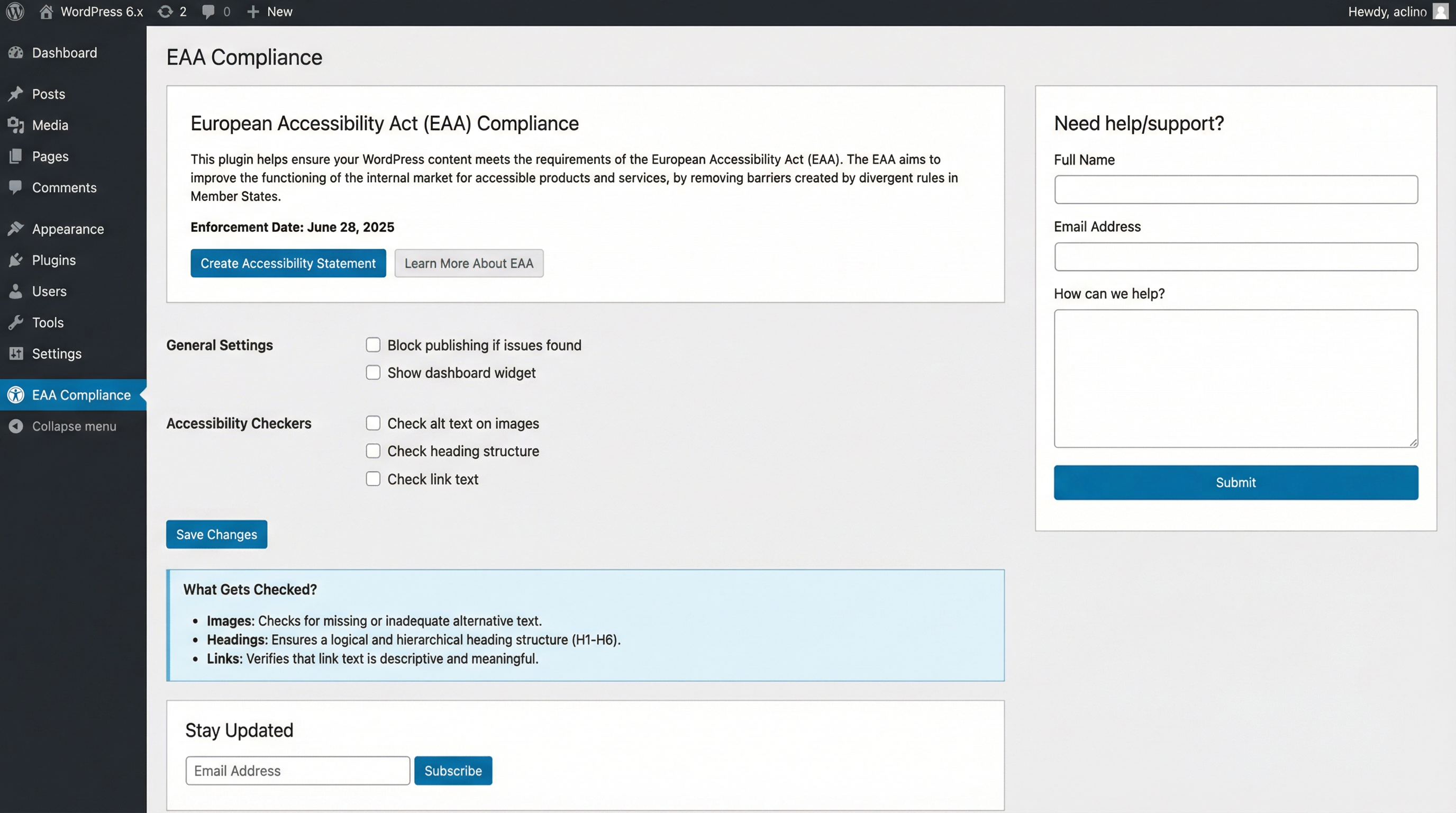
Main Content (Left Column)
General Settings
This section allows you to control the core behavior of the plugin:
•Block publishing if issues found: When enabled, this feature prevents users from publishing or updating a post if the content scanner detects any accessibility issues. This is a critical feature to enforce compliance across your team.
•Show dashboard widget: Toggle this to show or hide the EAA Compliance widget on the main WordPress dashboard.
Accessibility Checkers
Here, you can enable or disable specific checks that the plugin performs:
•Check alt text on images: Scans for missing or inadequate alternative text on images (WCAG 1.1.1).
•Check heading structure: Looks for skipped heading levels (e.g., jumping from an H1 to an H3) and empty heading tags (WCAG 1.3.1, 2.4.6).
•Check link text: Flags generic link text like “click here” or “read more” that is not descriptive (WCAG 2.4.4).
Newsletter Subscription
Stay informed about the latest EAA news, plugin updates, and accessibility best practices by subscribing to our newsletter. Simply enter your email and click Subscribe.
Sidebar (Right Column)
Support Ticket Form
If you need assistance or have a question about the plugin, you can submit a support ticket directly from this form. Fill in your name, email, and message, and our team will get back to you.
4. The Dashboard Widget
When enabled, the dashboard widget provides a convenient, at-a-glance overview of your site’s accessibility status right from your WordPress dashboard.
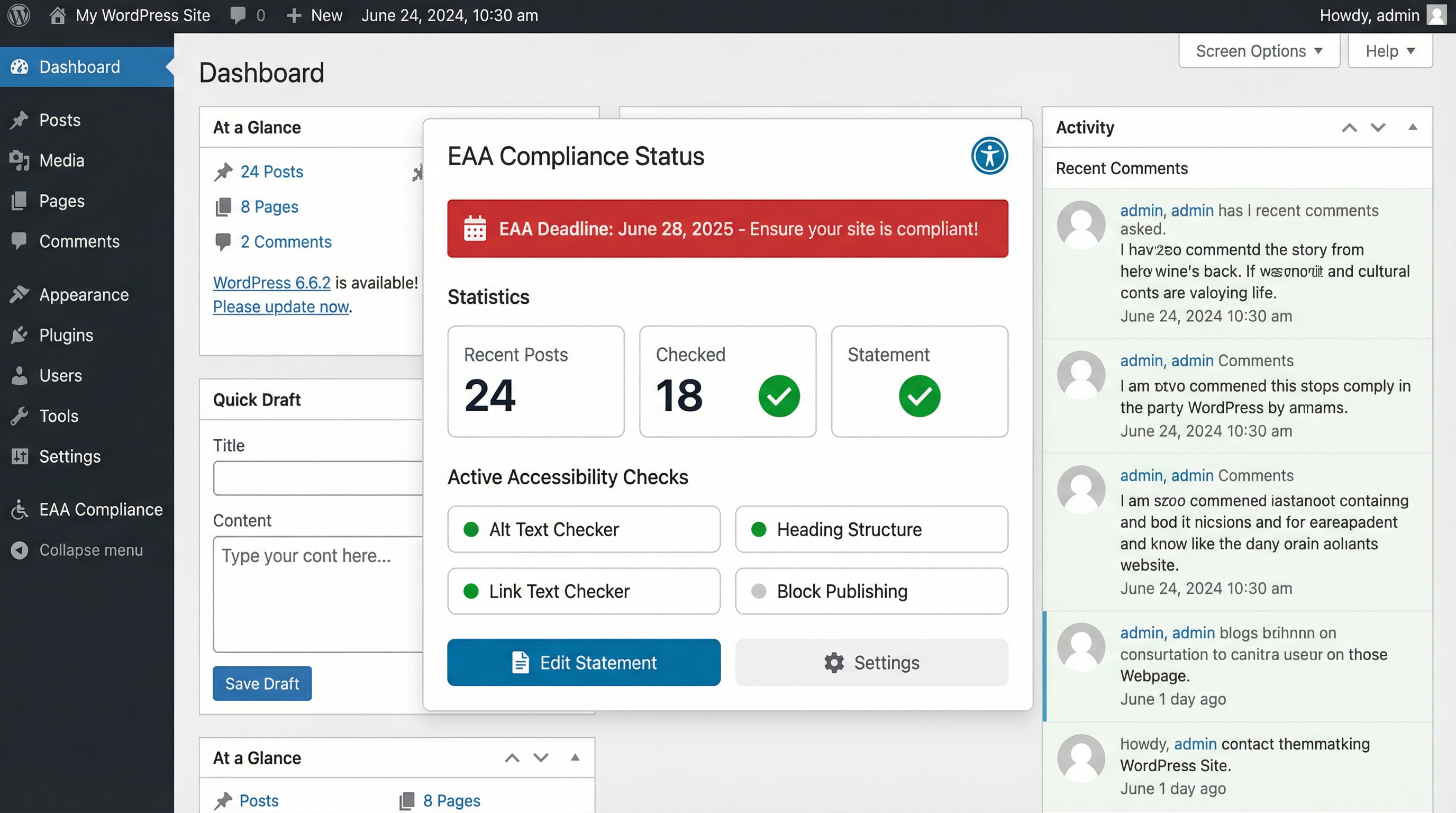
The widget includes several key components:
•Deadline Reminder: A prominent banner reminds you of the upcoming June 28, 2025 EAA compliance deadline.
•Statistics: Quick stats show the number of recent posts, how many have been checked, and whether an accessibility statement has been created.
•Active Checks: See which accessibility checkers are currently enabled, with a green dot indicating an active check.
•Action Buttons: Quickly navigate to edit your accessibility statement or go to the main settings page.
5. Real-Time Content Scanning
This is one of the most powerful features of the plugin. The scanner automatically checks your content for accessibility issues within the WordPress block editor before you publish.
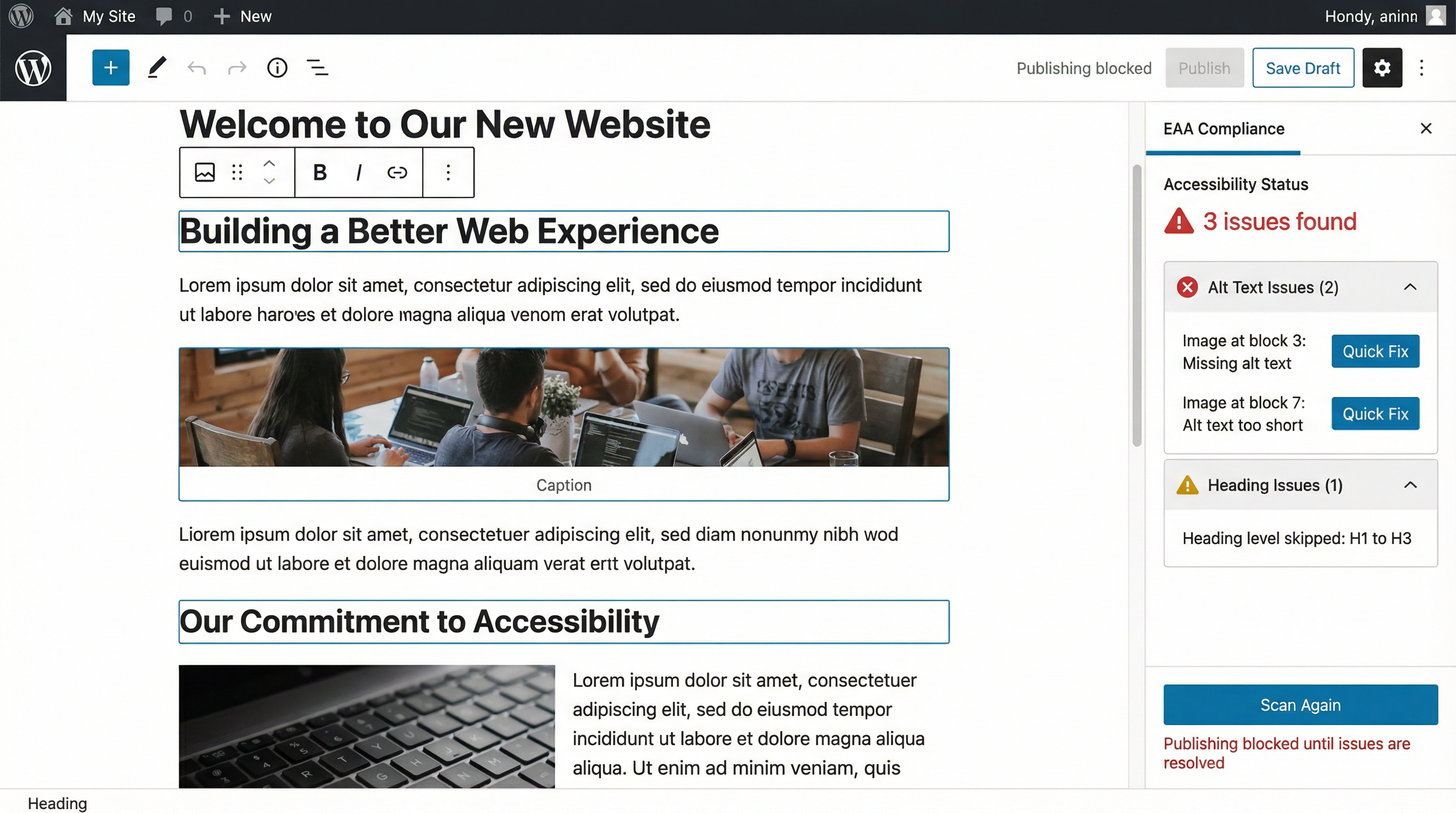
Here’s how it works:
1.When you are editing a post or page, the scanner works in the background.
2.If issues are found, the EAA Compliance panel in the editor’s sidebar will display a count of the issues.
3.The issues are categorized (e.g., Alt Text Issues, Heading Issues) and can be expanded to see details.
4.For certain issues like missing alt text, a “Quick Fix” button may appear, allowing you to resolve the problem directly from the sidebar.
5.If the “Block publishing” option is enabled in settings, the Publish button will be disabled until all issues are resolved.
6. Accessibility Statement Generator
An accessibility statement is a formal document that declares your organization’s commitment to accessibility and describes the measures taken to ensure your website is usable for everyone. The EAA requires one.
Our plugin makes creating this statement simple. Navigate to EAA Compliance > Accessibility Statement.
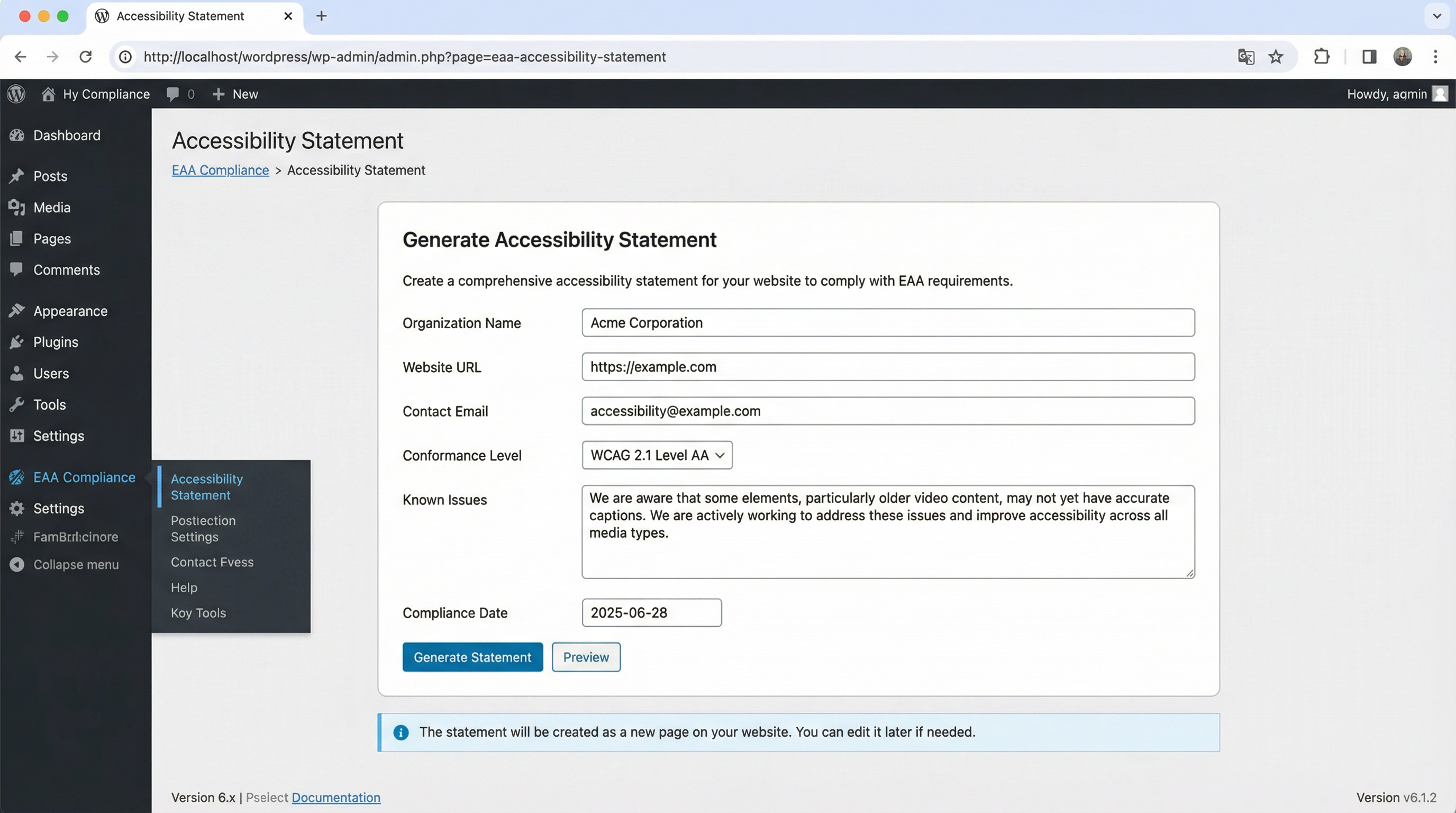
To generate your statement:
1.Fill in the required information, including your organization’s name, website URL, and contact email.
2.Select the conformance level your site aims to meet (e.g., WCAG 2.1 Level AA).
3.Describe any known accessibility issues or limitations in the provided textarea.
4.Set the compliance date.
5.Click Generate Statement. The plugin will create a new page on your website with a professionally formatted accessibility statement.
7. Frequently Asked Questions (FAQ)
|
Question
|
Answer
|
|
What is the EAA?
|
The European Accessibility Act is an EU law that requires a wide range of products and services, including websites and e-commerce platforms, to be accessible to people with disabilities.
|
|
Who needs to comply?
|
Any business offering products or services to consumers in the EU, regardless of where the business is based, must comply.
|
|
What happens if I don’t comply?
|
Non-compliance can result in significant fines, legal action, and damage to your brand’s reputation.
|
|
Does this plugin make my site 100% compliant?
|
No single tool can guarantee 100% compliance. This plugin is a powerful aid that helps you identify and fix common technical issues, but full compliance also requires manual testing and a commitment to accessible content creation.
|
Thank you for using the Innovs EAA Compliance plugin! We are committed to helping you make the web a more accessible place for everyone.